Manav Sampada UP Teacher Login: Basic Education, ID & OTP
Teachers in UP council primary and upper primary schools log in at ehrms.upsdc.gov.in. Click eHRMS Login, choose Basic Education as the department, then enter your Manav Sampada ID, password and captcha. If an OTP arrives on your registered mobile, enter it to open the account. Mobile number and record errors are fixed through your BRC and BEO offices, not by you on the portal.
Independent guide, not the official portal. Never share your password or OTP with anyone who calls.
Login Steps for Basic Education Teachers
- Open ehrms.upsdc.gov.in and click eHRMS Login.
- From the department list, choose Basic Education.
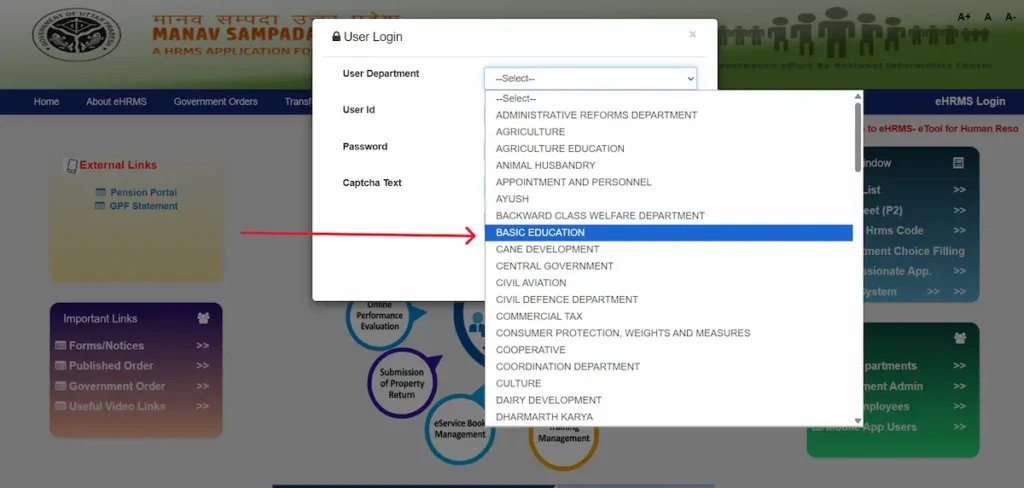
- Enter your Manav Sampada ID, password, and the captcha shown.
- Submit. If an OTP comes to your registered mobile, enter it and click validate.
Teacher community guides describe an OTP at every login, so keep the phone linked to your record with you.
Forgot your password? The reset screen also asks for your department, so choose Basic Education there too. The full reset process is on our Manav Sampada page.
Find Your Teacher ID Without Logging In
If you don’t know your Manav Sampada ID, ask your BEO office. They can confirm your ID and check that your mobile number is entered in your record.
The public Search Fact Sheet/P2 page asks for Parent, Organisation and a third required box that has no label, so don’t guess entries there to find your ID.
Why Teacher Logins Fail, and the Fix
OTP never arrives
Your mobile number is missing or wrong in your Manav Sampada record. Visit your BRC office to have the correct number entered. Until then, you can’t open the account or apply for online leave.
Captcha keeps showing invalid
A new captcha loads after each attempt. If you retype your ID or password but enter the old captcha, it fails. Refresh the captcha as your last step before submitting. Also check look-alike characters such as O and 0, I and l, and capital versus small letters.
Name or birth details are wrong
You can’t edit these yourself. Under the Basic Education Directorate’s July 2026 instructions, submit an application with evidence and original documents at your BEO or BSA office. The BEO checks it against original records and sends a recommendation to the BSA.
The Fact Sheet shows the wrong details
Record errors do happen. In March 2026, a report found 16 teachers sharing identical IDs on the portal. If your search shows mismatched details, report it to your BEO office with your appointment letter.
Which Office Handles What
| Office | Handles for teachers |
|---|---|
| BRC | Entering or correcting your mobile number in Manav Sampada |
| BEO (खंड शिक्षा अधिकारी) | Reporting officer for leave and service requests; verifies correction applications against original records |
| BSA (जिला बेसिक शिक्षा अधिकारी) | Accepts correction applications, receives the BEO’s recommendation, and handles leave beyond the BEO’s powers |
| Basic Education Directorate | Handles Manav Sampada actions, as directed by the Director General of School Education |
Leave steps, including adding your BEO as reporting officer, are covered under Manav Sampada leave.
Newly Appointed Teacher? Check These First
Teachers can’t register themselves on Manav Sampada. Your record is created at office level, so ask your BEO office for your first login details. Then:
- Search your name on the Fact Sheet to confirm your record exists.
- Check your name, date of birth, joining date and cadre.
- Confirm your working mobile number is in the record.
Portal-based transfers depend on correct joining dates, relieving and joining at each posting, and cadre, so fix errors early.
2026 Changes Every Teacher Should Know
- All leave through the portal. A Chief Secretary order dated 11 March 2026 directs that all leave be granted through Manav Sampada.
- Corrections handled by the directorate. From July 2026, Manav Sampada actions run at Basic Education Directorate level. The directorate also warned that correction cases sent without checking original records will not be tolerated.
- Subject mapping for transfers. For upper primary teachers, the subject shown on Manav Sampada is mapped from academic records, graduation subjects and appointment or promotion designation. The online transfer policy relies on this mapping.
- Annual entry for 2025-26. Workflow generation and self-assessment for the 2025-26 annual entry (वार्षिक प्रविष्टि) run through the portal.
- Prerna portal link. Prerna’s Teacher Log connects teacher profiles and school postings to Manav Sampada IDs, so keep your record accurate.
FAQs
Do upper primary teachers choose a different department?
No. Council primary and upper primary teachers both select Basic Education.
Is there a default password for teachers?
Teacher groups share formulas that don’t match each other. Get first login details from your office, or reset through Forgot Password.
Can I log in on my phone?
Yes, through the official mobile app. See Manav Sampada app for safe download steps.
Who is my reporting officer?
Your BEO. Leave beyond the BEO’s powers goes on to the BSA.
Can I apply for leave before my mobile number is registered?
No. Get the number entered at your BRC office first.