Manav Sampada UP eHRMS Portal Login, Leave & Salary Slip
Manav Sampada is the eHRMS portal Uttar Pradesh government departments use for employee HR records. NIC’s UP State Centre, Lucknow manages it at ehrms.upsdc.gov.in, while each department owns its data. Employees use it for leave, salary slips, the e-Service Book, property returns and transfers. To log in, click eHRMS Login, select your department, then enter User ID, password and captcha.
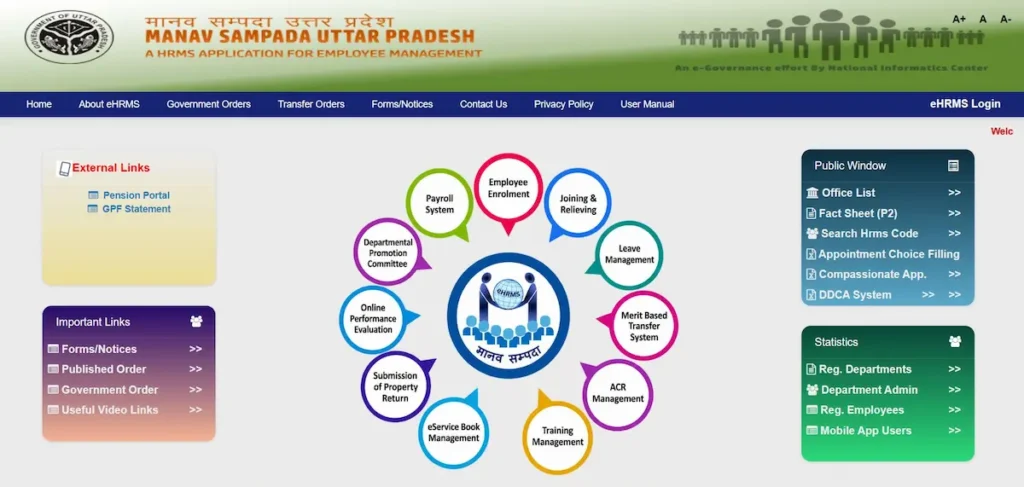
What Is eHRMS Manav Sampada?
Manav Sampada (मानव संपदा पोर्टल) is an electronic Human Resource Management System (eHRMS) built by the National Informatics Centre (NIC). Its Himachal Pradesh center developed it first, and the Ministry of Electronics and IT (MeitY) later funded turning it into a product other states could adopt.
NIC’s project documentation records its use in Himachal Pradesh, Jharkhand, Uttar Pradesh, Chandigarh, Punjab, Assam, New Delhi, Goa, Puducherry and others, covering about 16.1 lakh e-Service Books.
In Uttar Pradesh, NIC’s UP State Centre manages the portal. Its address uses the upsdc.gov.in domain of the Uttar Pradesh State Data Centre (UPSDC), set up under the National e-Governance Plan (NeGP).
Using it is not optional. The UP government requires every employee and officer to be registered on Manav Sampada, and leave is to be sanctioned only through the portal.
Official Manav Sampada Portal Addresses and How to Avoid Fake Sites
| State | Official portal |
|---|---|
| Uttar Pradesh | ehrms.upsdc.gov.in |
| Himachal Pradesh | genpmis.hp.nic.in |
If an old bookmark doesn’t open, check the address. NIC’s notice confirms Manav Sampada moved to the new link ehrms.upsdc.gov.in, so update any saved links.
Search results also show many look-alike Manav Sampada sites ending in .com, .in or .org. Before entering your User ID or password, check three things:
- The address ends in .gov.in for UP or .nic.in for Himachal.
- Install the app only from Google Play, never from a WhatsApp or SMS link.
- Leave any page promoting games, rummy or modded APKs.
manavsampaada.com is also unofficial. We are an independent guide: we explain each step, but you log in only on the official portal.
How to Do Manav Sampada UP Login (Step by Step)
- Open ehrms.upsdc.gov.in in Chrome or Firefox.
- Click eHRMS Login on the homepage.
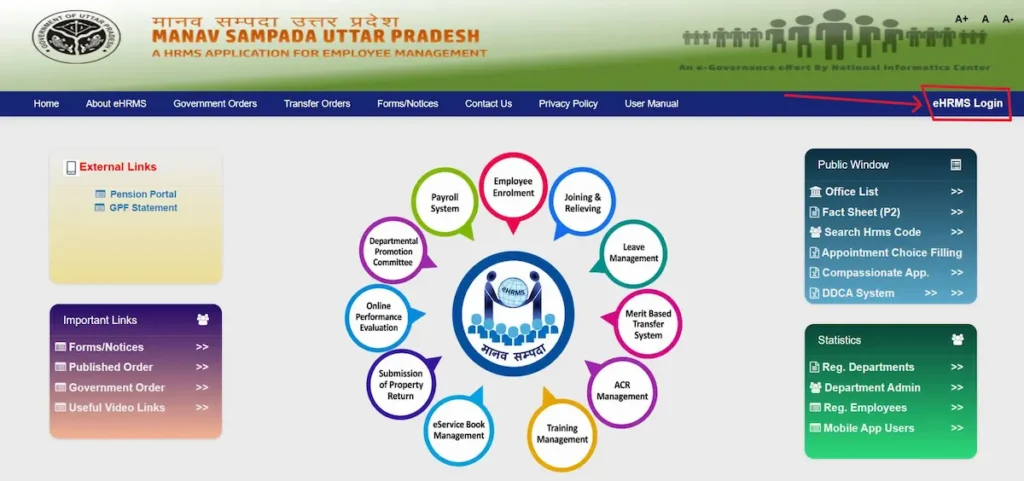
- Select your department from the list.
- Enter your User ID (employee code), password and the captcha shown.
- Click Login to reach your dashboard.
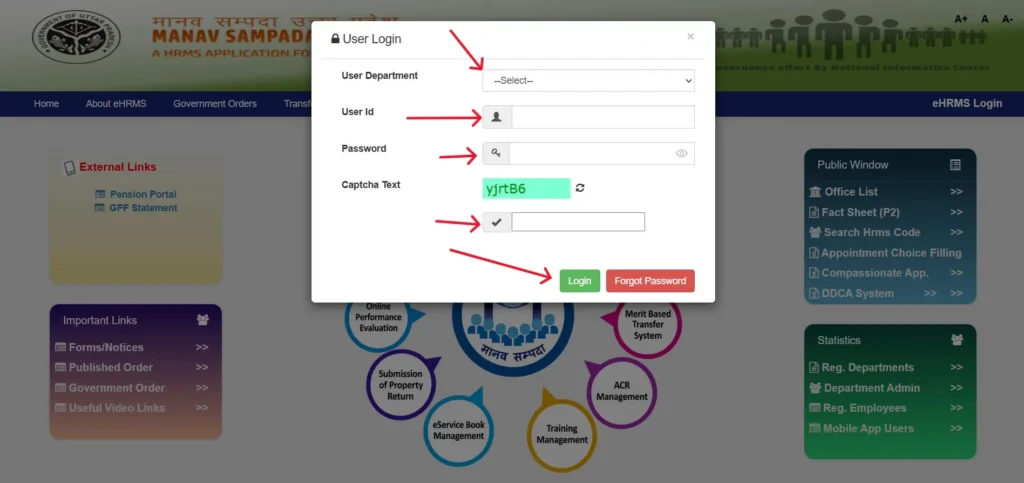
First login details come from your office. Employees can’t register themselves: in NIC’s system design, the Office Administrator registers employees, assigns roles and creates passwords. Ask your office or nodal officer for your User ID and starting password, and ignore any website offering a “default password” formula.
If you see an invalid user or password error, first check that you selected the correct department.
Teachers choose Basic Education, then follow our teacher login steps. Police staff should see UP Police access.
After your first login, change the password your office gave you. Never share an OTP or password with anyone, including callers claiming to be from the department.
Forgot Password or Don’t Know Your Employee ID?
Forgot your password
- On the login page, click Forgot Password.
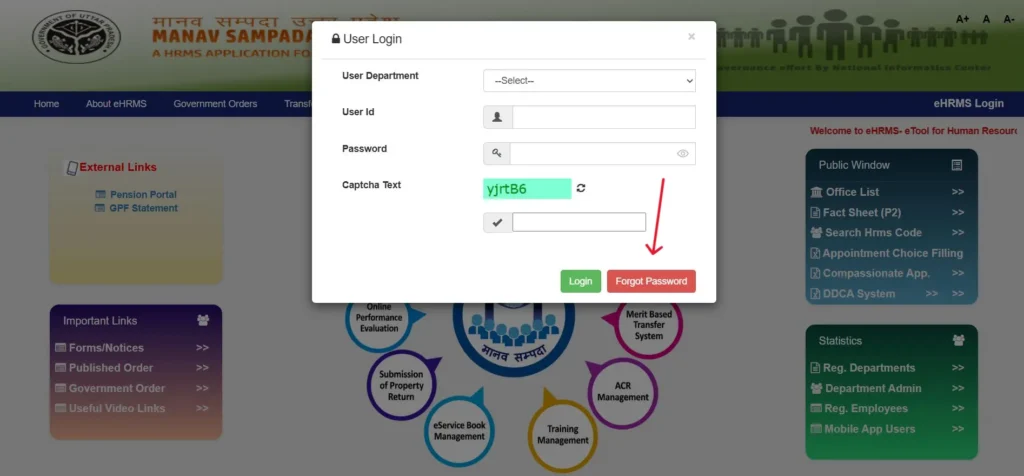
- Select your department.
- Enter your User ID or eHRMS code and the captcha.
- Submit and follow the on-screen instructions.
Recovery uses your registered mobile number. If the OTP doesn’t arrive, ask your nodal officer to correct the number, then try again. If online recovery still fails, contact your department’s HRMS administrator.
Can’t find your Employee ID
Check your appointment letter, salary slip, or service book, or ask your nodal officer. The public Fact Sheet (P2) page asks for Parent, Organisation and a required field with no label, so it isn’t a reliable way to find a lost ID.
What You Can Do After Login (New Dashboard, July 2026)
In July 2026, the UP portal rolled out a new dashboard, so older guides showing different menus are now outdated.
Your employee details now show your Manav Sampada ID and cadre (for example, AT Primary/Junior). A My Leave Balance panel shows your remaining CL (casual leave), EL (earned leave) and RH (restricted holiday).
The main menu is now grouped into four sections:
- General: your profile and employee details.
- Leave Module: apply for leave, check status and balance, or cancel a request.
- Payroll: choose the month and year, then download your salary slip as a PDF.
- Service Book: view your e-Service Book (सेवा पुस्तिका) and use the new option to request corrections to wrong entries.
For GPF or pension details, use the GPF Statement and Pension Portal links under External Links on the official homepage.
Services Available Without Login
You can use some reports on ehrms.upsdc.gov.in without a User ID or password.
Office List: filter by department and district to see the offices registered on Manav Sampada. Use it to confirm your office is on the portal before chasing a missing record.
Employee Fact Sheet (P2): Select Parent and Organisation, then fill the required field to view a service record.
Property Return on Manav Sampada: Why Salaries Were Stopped
Property declarations (संपत्ति विवरण) come from Rule 24, which covers movable, immovable and valuable property, in the UP Government Servant’s Conduct Rules, 1956, framed under Article 309. In March 2026, the cabinet approved amendments to Rules 21 and 24, requiring detailed property and investment disclosure and regular updates.
Employees had to upload property acquired up to 31 December 2025 on Manav Sampada by 31 January 2026. Over 68,000 missed the deadline, and their January salary was withheld.
Chief Secretary Sanjay Prasad Goel’s order gave defaulters a final chance until 10 March 2026. Non-compliance means salary stoppage and exclusion from promotion consideration, and false details can invite disciplinary action.
What to do: file before your department’s deadline, keep proof of submission, and ask your DDO if salary stays held after filing.
Real Problems Employees Face and How to Fix Them
| Problem | Why it happens | Fix |
|---|---|---|
| OTP not received | Mobile number wrong or missing in your record | Ask your nodal officer (teachers: BRC) to update it, then use Resend OTP |
| Portal won’t open | Old bookmarked address | Type ehrms.upsdc.gov.in directly |
| Can’t find Employee ID | Lost or never recorded | Check your salary slip or ask your nodal officer |
| Menus look different | July 2026 dashboard update | Use General, Leave Module, Payroll or Service Book |
| Wrong entry in service book | Data entered incorrectly | Request a correction under Service Book, then follow up with your office |
| Salary withheld | Property details not uploaded | Upload them on the portal, then check with your DDO |
| First leave request fails | No Reporting Officer added | Add a Reporting Officer first |
| Entered password on a fake site | Look-alike link from search or WhatsApp | Change your password on the official portal now and inform your nodal officer |
Still stuck? The next section lists who can fix it.
Who to Contact for Help
- Nodal officer: User ID, login access, and mobile number updates.
- DDO (Drawing and Disbursing Officer): salary bills and missing salary slips.
- Reporting officer: pending leave approvals.
- Your office’s establishment or HR section: service book entries.
- Teachers: your BEO or BRC office.
Don’t trust helpline numbers from unofficial sites; they conflict.
Manav Sampada FAQs
Is manavsampaada.com the official Manav Sampada website?
No. We’re an independent guide. Log in only at ehrms.upsdc.gov.in; we never collect your User ID or password.
Can employees register on Manav Sampada themselves?
No. Your office enters your service details and creates your account. New joiners should ask their office for login details.
Is there an official Manav Sampada mobile app?
Yes, on Google Play. Check the developer before installing; our app guide explains how.
Where do I download my salary slip?
After login, open Payroll, select month and year, and download the PDF. Banks often ask for it with loan applications.
Is Manav Sampada used outside Uttar Pradesh?
Yes. Himachal Pradesh, where it began, uses genpmis.hp.nic.in. Jharkhand, Assam, Goa and others also run it.