Manav Sampada Leave Apply, Status, Balance & Cancel
UP government employees now apply for every type of leave on the Manav Sampada (eHRMS) portal. Set your reporting officer once, apply with leave type, dates and reason, and attach a PDF certificate where needed. The same portal lets you delete a pending request, cancel approved leave, check your balance and report joining when you return.
Why Paper Leave No Longer Counts
A government order (GO No. 6/2026/86) issued by Principal Secretary Personnel M. Devraj says all leave, including CL, EL, medical and study leave, is accepted only through the portal’s Leave Module.
Departments also had until 25 March 2026 to enter each employee’s existing leave record, such as earned, medical and maternity leave, from the service book. Personnel Department letters dated 9, 22 and 30 December 2025 had asked for the same upload.
You can check the order’s authenticity on shasanadesh.up.gov.in.
Leave on Manav Sampada, Stage by Stage
The screen labels below are those described in reports of the March 2026 order.
Stage 1: Set your reporting officer (first time only)
Open General and choose Update Reporting Officer. If you don’t know the officer’s code, use Fix by Search to find them by name or post. Until this is set, your application has no officer to reach.
Basic education teachers select their BEO, as explained in UP teacher login.
Stage 2: Apply
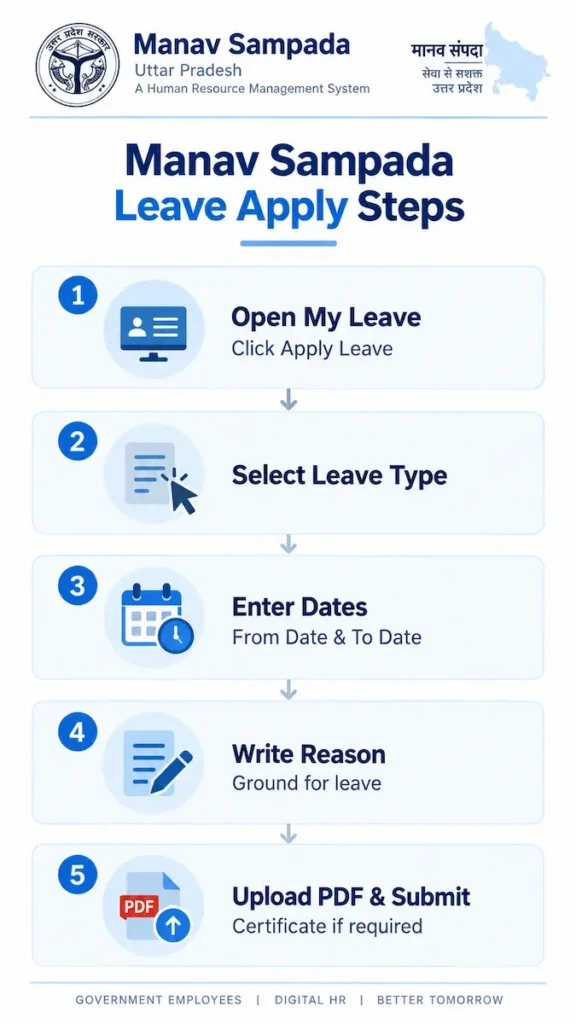
- Open My Leave and click Apply Leave.
- Select the leave type.
- Enter From Date and To Date.
- Write the ground for leave clearly.
- Upload the certificate as a PDF if the leave type needs one, then submit.
The portal works out Sundays and public holidays that fall inside your leave period, provided the form is filled correctly.
Stage 3: While it’s pending
Your reporting officer can approve it, forward it to a senior officer, or reject it with a reason. Until a decision is made, you can delete the request yourself.
Stage 4: After approval
Plans changed? Approved leave can be cancelled on the portal. Check remaining days anytime through View Balance or View CL Book.
Stage 5: Leaving headquarters
To leave your headquarters station, take permission through Apply Station Leave.
Stage 6: Back on duty
When leave ends, report your return through Send Joining Request.
For Reporting Officers
Pending requests appear under Other Leave on your dashboard.
| Action | Use it when |
|---|---|
| Approve | The leave falls within your powers and documents are in order |
| Forward | A senior officer has to decide |
| Reject | There is a valid reason, which you record with the rejection |
The official Manav Sampada app also lets reporting officers view, approve or reject their subordinates’ leave.
What to Upload by Leave Type
| Leave type | Upload |
|---|---|
| Casual leave (CL) | No application letter; teacher guidance lists only dates, reason and address during leave |
| Medical leave | Medical certificate as a PDF |
| Child Care Leave (CCL) | Application signed by the head of institution, affidavit and child’s birth certificate, combined into one PDF |
| Maternity leave | Application with doctor’s documents such as the ultrasound report |
CCL rules worth knowing
Female government servants in UP can take up to 730 days of CCL across their entire service. With three living children, it is allowed for the two eldest. The affidavit should state how many children you have, which child needs care, and that child’s age.
File size
Teacher sources quote different PDF limits, 1 MB and 2 MB. Scan documents compactly, and if an upload fails, reduce the file size before trying again.
Applying From Your Phone
The official listing confirms you can view leave balances, apply for leave or tour, delete pending leave and cancel approved leave on mobile. Install it safely using our Manav Sampada app steps.
FAQ
Can I still hand in a paper application?
Not on its own. Under the 2026 order, leave is sanctioned only through the portal.
What is the difference between delete and cancel?
Delete removes a request still pending. Cancel withdraws leave that was already approved.
My balance doesn’t match my service book. Why?
Departments uploaded existing leave records from service books in March 2026. Ask your office’s establishment section to check the entries.
My request has been pending for days. What should I check?
Confirm the correct reporting officer is set under General, then contact that officer.
Who approves leave beyond my reporting officer’s powers?
The officer forwards it to a senior officer, who decides.